What computer use unlocks
Coding models and harnesses are great at executing on a user's intention when the only interface needed is code. But one limit to long-horizon agents working is computer use: verifying the model did what it said it did, testing the generated code, and choosing the correct corrections and next steps. Models should be able to self-verify and self improve, which is partially promised by coding and I believe completed by RL and computer use.
For models to do everything that someone does every day, it needs to sign into any account in the browser directly using browser-use variants or MCPs, interact with visual content like video editors and legacy software (eventually), and learn arbitrary multi-app multi-turn desktop workflows: it needs to be able to control the full suite of desktop that it can connect to along with the mouse and keyboard right now. But computers and browsers have spent decades protecting against exploits by walling cross-application interaction to only be accessible via clicks and typing, and full "agentification" where Claude Code can control everything is not immediate. Case in point, all the existing coding harnesses need you to manually sign in and get API keys for them, which seems obliviated by good computer use.
Existing pure-coding puppeteer-style imitation models can't visually reason about the rendered UI, but they are useful as an intermediate step for deterministic tests. Screenshot-based computer action models are hard to use primarily due to speed and accuracy: recommending one action per LLM query makes recognizing mistakes + recovery difficult, and makes it hard for the model to unlearn bad behavior without RL. We've spent the last 2 months building a better computer use 'brain' that works across macOS, Windows, and Android, and harnesses + model improvements + an SDPO pipeline for continuous self improvement and automatic speedups.
Personalization, Speed, and Accuracy
There are many approaches to computer use. We think the ideal system is a combination of per-user specialized learning, harnesses with existing models optimized for accuracy, coding model access to automate the easier things, and custom video models optimized for speed. To optimize computer use tools in the real world, they need to work for 1) workflows specialized to each individual person and 2) optimize for speed and accuracy.
To specialize computer use agents to each user, our plan is learn from a user's continuous screen recording. From their daily activities (or scoped work tasks), we compare our model's predicted actions to the one that actually happened, then RL the model with a custom LoRA per user to learn those ideas over time, and also learn generalized skills based on the video understanding on their data. We are actively exploring distilling these via RL, distilling into detailed skills, and per-task LoRAs that specialize a computer use model's execution to a specific user's workflow.
Speed comes through both implementation tricks and some cleverness with RL. For tricks, we have quick, learned heuristics to learn when to send screenshots and not, when to use a fast video action model vs a language model, and multi-model routing based on intelligence. To optimize for accuracy, we used auxiliary signals (self-reflection, AXTree ground truths, user trajectories) to aggressively un-learn outdated website setups and rapidly learn new ones. Next time a user wants a new website, we intend to have a a pipeline that lets us learn it on-the-fly by spinning up parallel sandboxes controlled by coding agents to learn how to navigate them. We explain how we use RL to compress insights in the Low Latency Harnesses section below.
We built a single cloud harness that connects to thin interfaces on macOS and Windows, as well as iOS and Android. The interfaces parallelize routing, handle screenshot streaming, control how possible mouse/keyboard/code actions are routed to apps, and run fast-verification loops.
On machine
Thin client
Runs on the target machine. Captures screenshots, stream compressed diffs to the server. Executes returned actions locally via platform-native APIs, and do rapid verification and tree 'pruning'.
On cloud
Reasoning service
Runs OCR racing, element map building, multi-model LLM racing, planning, and reflection. Uses video codec diffs or image diffs for fast frame reconstruction.
Low Latency Harnesses
The main issue with computer use is that it doesn't use my computer faster than I do. Beyond simple optimizations like multilayer reasoning (i.e. fast model acts while slow model plans and occasionally injects guidance), we need to parallelize planning and execution in a deeper way.Branching tree search for planning
The biggest gains for latency are from conditional parallelization in our action planning. Current agents do not parallelize planning and action; then sequentially observe, then think, then take one action, then observe again and so on. Our idea was tree-based planning, where the agent explores multiple possible action->next observation states in parallel, evaluates which branch best matches the one we observed, then immediately takes the precomputed action for that state. When the UI changes unexpectedly, the tree is recalculated from scratch for the current reality. This lets us plan many steps ahead, and recover if it ends up in an unintended state.
An example might help illustrate this more concretely. Let's say our model predicts based on the last 1 second of video data, and our model takes 500ms each forward pass. Normally, these would happen sequentially. We can overlap these via speculative planning, by having our model ahead of time predict *all possible next* 1 second possibilities. As long as our system for video generation + action prediction + state matching takes under 1 second, we no longer need to take an additional 500ms inference step afterwards. Once this prediction model finishes predicting multiple plans, at the end of that second, we only need to *determine which world you are in* and immediately take that action, not waiting to predict the action anymore. Of course, if we couldn't predict the current state accurately enough, we are back to square 0, so it's important that we properly learn next state and action prediction.
One way to sidestep video inference entirely is to implement this state-video-action planning idea via a text-only version compatible with LLMs: all the state predictions are defined with text (i.e. either I see X typed, or I see screen Y, or I see a popup), all the validations are text checks (i.e. did X get typed), and all the actions come from a text-only or screenshot-only prediction. To keep latency variance low, we run several action prediction models in parallel (i.e. Gemini Flash Lite, Claude Haiku, our fine-tuned Qwen), and take the first valid JSON response.
One interesting RL experiment here is that having a tree-like action tree gives a natural way to learn from successful rollouts -- traditionally, self-distillation RL algorithms like SDPO do best learning from failure, because learning from success often has unclear reward signals. However, we can apply self-distillation here to learn the state transitions via trying to learn the next screens earlier in the tree state prediction step -- thus learning the state transitions themselves, not just the failure/success signal.
Verification Gates
To rapidly verify action success, we run a local OCR-only verification check. This takes under 200ms and avoids the agent from going too far off the right trajectory.
step 1: click btn_compose
verify: text_visible "New Message"
step 2: type inp_to "[email protected]"
verify: text_visible "alice@"
step 3: click btn_send
verify: text_not_visible "New Message"
Verify gates check simple conditions: is this text visible? Does this element exist? Is the right app in the foreground? Is the keyboard showing? We pay the cost of a single OCR, not a full LLM forward pass.
Now, instead of multi-step execution being the standard screenshot-action-screenshot loop that costs 3-8 seconds per step, we can chain 3-10 possible actions per iteration. The verify gate catches failures immediately. If step 3's verify fails, we break, re-capture the screen, and re-plan. Tasks that take standard agents 15-20 reasoning model calls (at 5 seconds each) take us *more* model calls and tokens total, but less end to end latency.
<250ms
OCR + Verify gate latency
3-5
Tree depth per iteration
3-5
Choices per layer of the tree
Frame Streaming
The latency for upload, even of a 800KB JPEG (an average compressed full screen), on a standard 1 MBPS upload home connection, is about 0.8 seconds -- this kills both OCR latency and LLM inference time. Instead, we have the client continuously stream compressed frames to our server at 3 frames per second, even if LLM inference is only happening at one frame every 3 seconds. When we need to actually process it, we only need to upload the latest raw XOR, allowing us to rapidly re-render the full frame on the server. Compressed diffs (mostly 0s) are only ~20KB per frame.
In practice, since you can't XOR JPEGs directly, a pre-initialized H.264 P-frame diff adds an additional ~20ms of latency, but keeps the upload (after the first frame) ideally timed. In addition, when aligned with our custom model, this encoding on the client side can *directly* feed into the video model. In the future, we could send even less data on very slow connections by running the first embedding layer locally on the client side (for a higher latency cost).
Screen to Text Translation
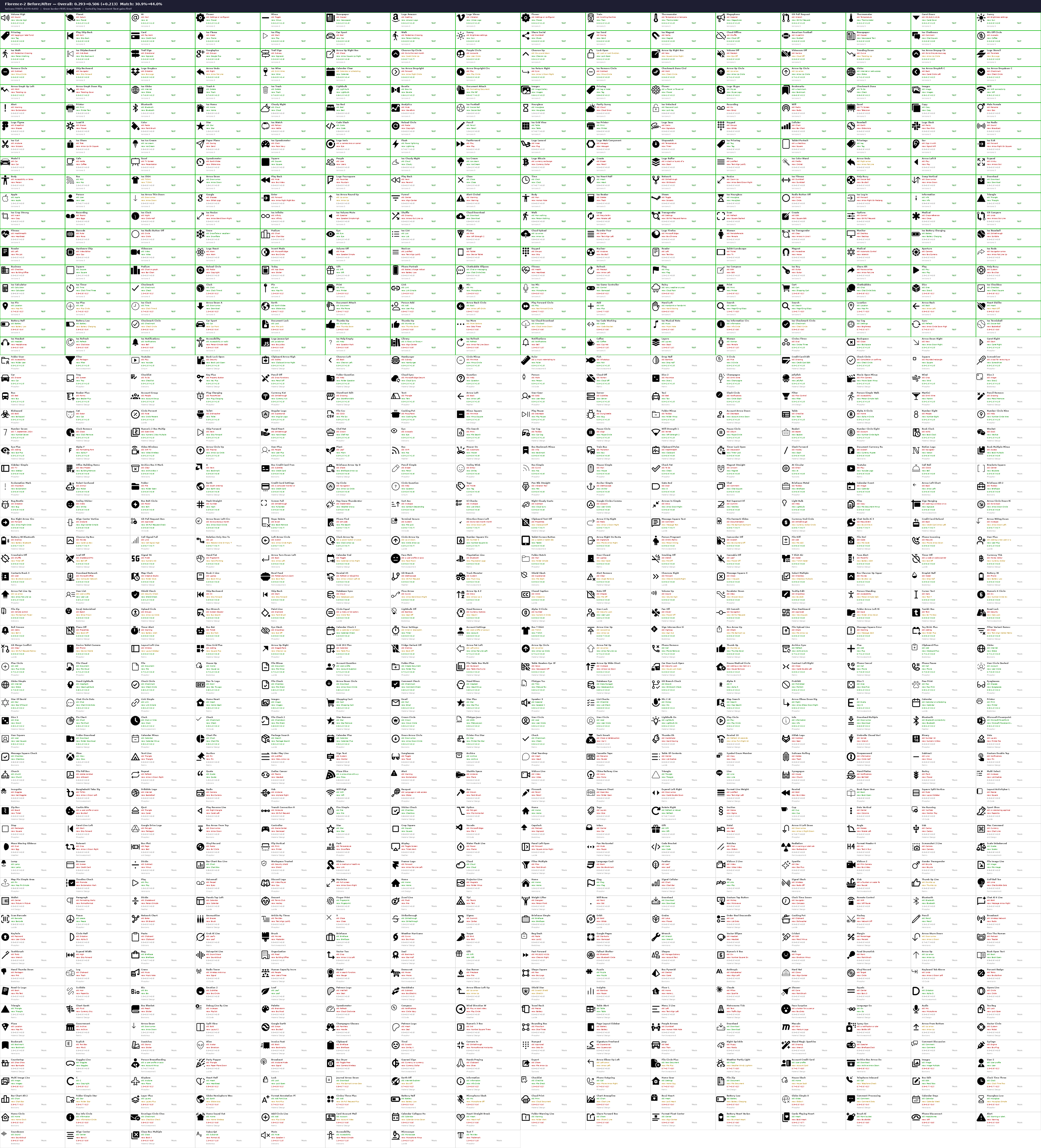
If we want to prototype what this rapid action video model looks like with a text model, we need to convert the current on-screen images to text rapidly. Existing harnesses rely on different things here, including accessibility trees or screenshots. We think that accessibility tree data for prediction is an unreliable crutch, as that data may not always be available (when it is, we can use it as ground truth data to fine tune on). With good OCR, we can give the LLM semantic IDs like btn_save with pixel coordinates as a substitute for raw screenshots. To do this, we fine-tuned Omniparser V2 to work on icons extremely well, and to identify which elements are clickable. You can see the results below.
Custom Trajectory Collection
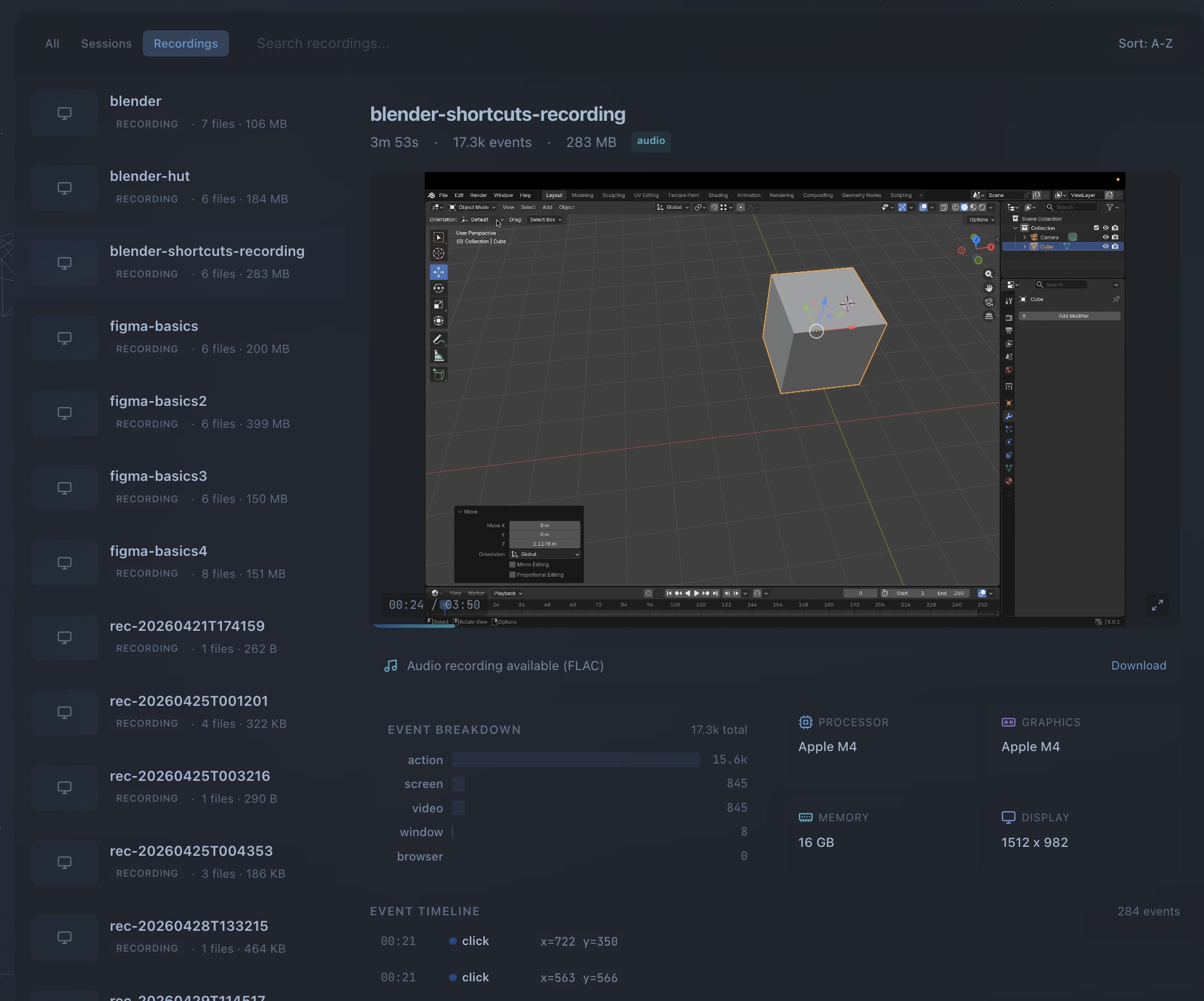
Training data comes from our own screencap.sh tool: we record labeled desktop sessions that adaptively chooses (with interactive user overrides) what windows to capture, extracts frames at 4-10 FPS, and logs all click events (and with consent, all network requests).
Custom video models
Frontier APIs are the default for text input, but they're not always the right tool. For latency-critical grounding or action prediction on dense visual environments such as CAD, design, navigation, or video editing, we train our own rapid action video codec models and swap them in when we need tighter control over speed, cost, or behavior.
We built a multi-turn computer use agent with a OneVision video encoder that takes in the codec diff of the last frame, a Qwen 3 reasoning layer, and a lightweight action decoder. The vision encoder is frozen; we train LoRA adapters (rank 64, targeting all attention and MLP projections) on trajectories labeled by a more intelligent model, across Ubuntu, Windows, and macOS. When the task is well-scoped and latency matters more than raw reasoning power, we swap the harness from the frontier models to our custom video models and can cut inference latency by a factor of 5.
To train this, we need to convert our recorded screencap data with per-frame action supervision: we do this by reverse engineering click coordinate heatmaps from the click we collected, then using that as an additional supervision signal for training.
This decoder handles the cases where you don't need reasoning, you just need to know where to click next. It runs alongside the main harness as a fast fallback: if the element map is rich enough and the next action is obvious, the decoder resolves it in milliseconds instead of waiting for an LLM round-trip.
On-device mobile agents
Every Android agent we saw either ran on an emulator or had the phone tethered via ADB and allowed ADB commands, which we thought was cheating. We wanted our system to be able to run with no setup and untethered, on a new Android phone. AgentRelay runs entirely on the phone, for both Android and iOS. This is how we expect real users to use mobile computer use: they'll tell their phone to do something (likely with voice) and put it down. Our floating bubble overlay lets you launch a task, watch the agent work via a transparent status overlay, keeps the screen on, and the user can intervene if needed by just tapping.
Real-time Android agent on a stock device — no ADB, no emulator. Prompt: "Find me an Airbnb in San Francisco for 10 people this weekend. Money is no object, pick the best place."
The agent clicks where needed, handles popups, recovers from failure mid-task, and asks the user for clarification when intent is ambiguous. We can easily un-learn the failures via forking rollouts (VinePPO-style) and using straightforwards self-distillation RL to learn from failures.
What's next
Integrating with Coding Agent Harnesses
So far, coding harnesses can't see a screen, click a button, grab an API key, or navigate a form. The inability to manipulate a screen is a big reason why they can't do end to end tasks. We think computer use will become a tool call when your harness needs it.
Massively parallel trajectory generation
Supervised training data for computer use is expensive to collect because it requires human demonstrators. We're building infrastructure to generate it synthetically at scale. Thousands of forked VMs, each running a headless browser, randomly exploring websites: clicking links, filling forms, navigating menus. Every session is recorded as a frame sequence with pixel-level action labels. After collection, we retroactively label these trajectories with task descriptions and success signals, producing training data without any human in the loop. The key insight is that random exploration with retroactive labeling is cheaper per trajectory than directed human demonstration, and scales horizontally with compute.
One-shot grounded reasoning
Current computer use agents separate perception (detect elements, build an element map) from reasoning (decide what to do). This pipeline adds latency and loses spatial context at every handoff. We're training models that ground directly: given a screenshot and an instruction, output the target coordinates and action type in a single forward pass with chain-of-thought reasoning embedded in the generation. No element map construction, no separate OCR step, no coordinate post-processing. The model learns to attend to the relevant region and reason about it simultaneously.
Self-reflection
We built a self-reflection mechanism that allows the agent to review its own actions and decisions. Every time the agent runs on an app and screws up, it notices and learns a skill to prevent it. Every time it succeeds two steps in a row, it learns a skill to chain them in the tree in the future. Over time, the agent gets better.
VM Forking
To do GPRO style online RL, we can use super optimized Ubuntu forking to immediately fork and rollback if system state is entirely contained within the VM (i.e. not on an external database). Training this on open source repos and desktop apps will allow us to do RL on our agents.
Video generation and comparison
We want to use a fast, near-realtime video generation algorithm to predict the all the possible evolutions of the state. This will let us compare the predicted possible states to the actual state, and correct in real time.
Sample-efficient imitation learning
The hardest tasks aren't outside the pre-training distribution. Niche enterprise software, internal tools, and domain-specific workflows will not appear in our synthetic trajectory data unless we obtain it from enterprises. To learn those quickly, we want a rapid imitation learning pipeline where a human demonstrates a new task once, and the agent generalizes from that single demonstration. The system records the demonstration as a trajectory, and optionally creates augmented training variants by changing the fields filled in i.e. form entry variants. One demonstration produces hundreds of training samples. The goal is to move from "train on millions of trajectories" to "show it once and it learns," closing the gap between general-purpose agents and task-specific automation.
We're hiring engineers who want to work on difficult systems, data collection, and training the best models. If you're interested in building the systems layer for autonomous computer agents, reach out at [email protected].